
Displaying first-party store credit and wallet transaction data directly on your storefront is essential for building an optimal customer experience. While native Shopify Liquid lets you easily retrieve a customer’s raw balance, loading a fully localized, auditable transaction history requires integrating with Shopify's Customer Account API or a specialized app script. Giving your shoppers a transparent look into their funds builds immediate trust, reduces customer support tickets, and boosts repeat purchases.
Key Takeaways
- Native Liquid Support: You can natively output a customer's total store credit balance using the standard customer store credit account balance tag.
- Transaction History Scope: Native Liquid does not loop through store credit transaction histories directly on standard theme files; this requires a Customer Account API GraphQL query or an external wallet app.
- Theme Requirement: Native store credit features strictly require New Customer Accounts to be enabled within your Shopify admin settings.
Understanding the Shopify Store Credit Liquid Architecture
Shopify's modern architecture exposes the store credit account as a direct property of the global customer object. This engineering choice allows you to dynamically display wallet balances across your theme templates, such as your main account page, provided the customer is securely logged in.
When you want to track customer wallet transactions Shopify store credit transaction history, relying solely on basic theme templates won't cut it. The core balance snippet is straightforward, but it only shows the final number, not the detailed journey of how the customer got there.
To output the authenticated user's current wallet balance with their selected local currency format using Shopify store credit liquid tags, you can use a simple conditional wrapper. You just need to check whether the customer session is active and whether the store credit account object exists; if so, render the balance in the store's currency format.
While a basic snippet shows the current balance, customers consistently want transparency. They expect a clear customer wallet history Shopify portal where they can look at past actions. To build that, we have to look past standard templates and connect directly to Shopify's modern API frameworks.
Deep Dive: The Mechanics of Store Credit in E-Commerce
Why are brands moving away from traditional discount codes and leaning heavily into digital wallets? The answer comes down to financial flexibility and psychological ownership. A discount code feels like a coupon—it can expire, it feels marketing-driven, and it can easily be lost in an inbox.
On the other hand, store credit feels like real money. When an individual logs in to an e-commerce platform and sees a tangible balance in their account, their perceived value of that store increases dramatically. They are far more likely to return and complete a purchase because they don't want to "waste" their money.
However, displaying just a flat balance without context creates friction. Imagine logging into your online banking app, seeing that you have $100, but having absolutely no record of where your last paycheck went or what your last purchase cost. It would feel jarring and untrustworthy. The exact same rule applies to the online shopping experience.
If a shopper notices their balance has shifted from $50 to $30 but cannot see an itemized receipt or ledger explaining why, they will immediately reach out to your support team. This floods your helpdesk with repetitive, manual tasks that could easily be automated on the frontend.
By implementing a native Shopify store credit liquid framework paired with frontend asynchronous calls, you bridge the gap between static data and a dynamic user experience. You allow the customer to self-serve by finding their own answers about gift card balances, loyalty rewards, or return credits without ever needing to open a live chat widget or send an angry email.
Building a Dynamic Customer Wallet History Shopify Tracker
Instead of forcing your development team to write custom API scripts, handle client-side GraphQL queries, or mess with fragile template files, Custlo brings comprehensive, out-of-the-box transaction tracking to your storefront. The entire ecosystem operates on a two-way sync: a powerful internal administration panel for your team, and an intuitive, beautiful dashboard for your registered buyers.
How Merchants Track Wallet History via the Custlo Dashboard
When an order is returned for store credit or a customer asks why their loyalty balance changed, you do not have to dig through complex Shopify admin logs or run database queries. You can verify any shopper's complete digital wallet history in just a few clicks directly from the app interface.
Here is exactly how to manage it:
Step 1 - Open the Custlo App
Log in to your Shopify Admin panel, navigate to your installed applications, and click on Custlo to launch the central app dashboard.
Step 2 - Access the Customers Page
From the main sidebar menu of the Custlo interface, click on the Customers page.

Step 3 - Filter and Select Your Target Shopper
By default, the All Customers view is selected, displaying your complete store database. Use the search bar or list to click into the profile of the specific customer whose store credit or wallet history you need to review.

Step 4 - Review the Store Credit Transaction Timeline
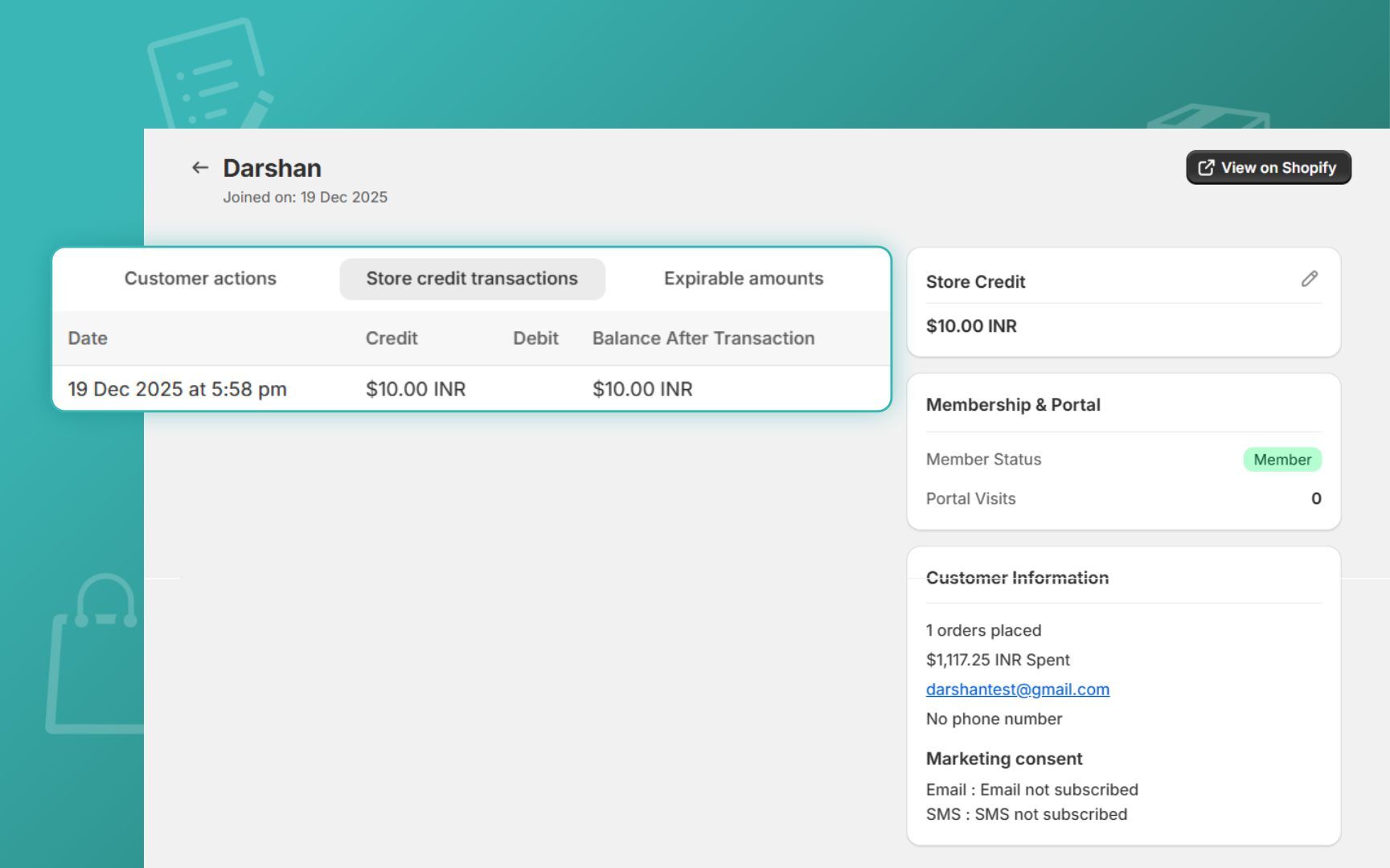
Once inside the customer profile, view the dedicated transaction timeline panel. This ledger lists every store credit action associated with that individual's identity.

Having this comprehensive ledger right in front of your customer support team makes verifying credits, manual debit deductions, cashback awards, and promotional adjustments incredibly fast. Instead of guessing or escalating technical issues, your helpdesk agent can resolve balance queries in seconds, lowering support overhead.
Empowering Customers with a Self-Serve Wallet Portal
The exact same transaction transparently syncs to the frontend, eliminating repetitive support emails altogether. By accessing the Custlo visual editor, you can enable the dedicated Cashback/Store Credit tab directly inside the customer account page.
Once activated, your shoppers log into their modern, passwordless account dashboard and see an app-like, mobile-responsive portal that explicitly displays:
- Current Available Store Credit: A clear, real-time hero banner highlighting their total active wallet funds ready to use at checkout.
- Complete Transaction History: An itemized ledger detailing every financial interaction they have had with your brand.
- Credits Earned: Transparent tracking showing automated cashback rewards gained from successful orders, signup bonuses, or birthday perks.
- Credits Redeemed: Precise records detailing when and where they applied their balance toward past purchases.
- Recent Wallet Activity: Chronological updates outlining recent adjustments, ensuring they always feel in control of their digital money.
Deconstructing the Wallet Transaction Types
When you manage your store credit workflows inside Custlo, you will see highly specific, descriptive transaction labels rather than cryptic system logs. Understanding these transaction types allows your support team to read client accounts easily and configure accurate automation rules.
Here are the primary transaction types tracked within the Custlo database:
- Credit (Store Credit Added)
- What it means: A straightforward injection of funds directly into the user's account balance.
- When it appears: This is logged when store credit is chosen over a standard payment method refund during a return process, or when an administrative user manually adds funds to incentivize a high-value customer.
- Why it is useful: It provides an instantly visible trace of financial growth in the user's wallet, ensuring your financial accounting lines up perfectly with customer returns.
- Debit (Store Credit Redeemed)
- What it means: A formal deduction from the active store credit wallet.
- When it appears: The exact moment a logged-in buyer successfully applies their available wallet funds at checkout to pay for an order.
- Why it is useful: It verifies exactly how much store credit was used as a payment method for a specific Order ID, preventing double-spending disputes.
- Cashback Rewards
- What it means: An automated financial incentive given to a shopper as a percentage of their order value.
- When it appears: This triggers automatically after a customer completes a purchase that satisfies your store's active cashback criteria (e.g., Earn 10% back on all purchases).
- Why it is useful: It tracks the exact performance of your retention campaigns, showing you precisely how much automated loyalty capital Custlo is issuing to drive repeat purchases.
- Manual Credit Adjustments
- What it means: A deliberate, staff-initiated addition of wallet capital.
- When it appears: Applied manually by your customer support reps through the Custlo dashboard as a good-faith gesture, compensation for a shipping issue, or a custom VIP bonus.
- Why it is useful: It assigns accountability to manual adjustments, making it easy to audit why an agent chose to award extra store credit outside of a standard purchase flow.
- Manual Debit Adjustments
- What it means: A deliberate, staff-initiated subtraction of wallet capital.
- When it appears: Used by administrators to manually revoke store credit that was issued in error or clawed back due to an altered transaction.
- Why it is useful: Gives your team total balance control, allowing you to fix ledger mistakes or reverse fraudulent activities without breaking the user's account profile.
- Reward-Based Credits
- What it means: System-automated credits tied to milestone actions rather than direct purchases.
- When it appears: Triggers instantly when a customer satisfies a specific Custlo milestone rule, such as completing a new account registration, subscribing to your newsletter, or hitting their birthday.
- Why it is useful: It differentiates organic purchase-driven cashback from promotional milestone rewards, letting you evaluate which specific acquisition campaigns are driving the most account signups.
- Order-Related Credits & Deductions
- What it means: Balance updates directly linked to changes in order status after checkout.
- When it appears: Automatically updates if a checkout session is altered mid-stream, or if a paid order using store credit is subsequently canceled or adjusted by your fulfillment team.
- Why it is useful: Keeps customer ledgers beautifully accurate by protecting your margins from canceled orders and ensuring customers are instantly made whole if a transaction doesn't go through.

When to Pivot to a Dedicated Shopify Wallet Transaction History App
If editing theme templates, managing GraphQL endpoints, or writing custom Shopify store credit liquid scripts feels a bit too complex for your current project scope, migrating to an official app store option is highly practical.
Using a pre-built Shopify wallet transaction history app brings several distinct advantages for growing brands:
- No-Code UI Blocks: Modern tools utilize Theme App Extensions. This means you can drag and drop a fully stylized customer wallet history Shopify panel directly into the customer account page using the standard theme visual editor, entirely bypassing the need to touch any core template files.
- Complex Multi-Currency Ledgering: If you sell globally, handling store credit across different international currencies gets confusing at times. Specialized apps compute exchange rates on the fly so the customer always sees their balance in their local currency, protecting your profit margins from fluctuating FX rates.
- Automated Customer Support Workflows: Advanced systems let your support team issue bulk credits, set up automated birthday rewards, or trigger abandoned cart credit incentives without writing manual backend code. This transforms your wallet engine from a simple tracking sheet into an active marketing channel.
Whether you decide to build a custom solution from scratch using Shopify store credit and Liquid code or deploy an external plug-and-play app, keeping an open, clear, and visible transaction history protects your customer relationships and drastically reduces support tickets. Giving your users the autonomy to review their own transaction ledger turns casual shoppers into lifetime brand advocates.