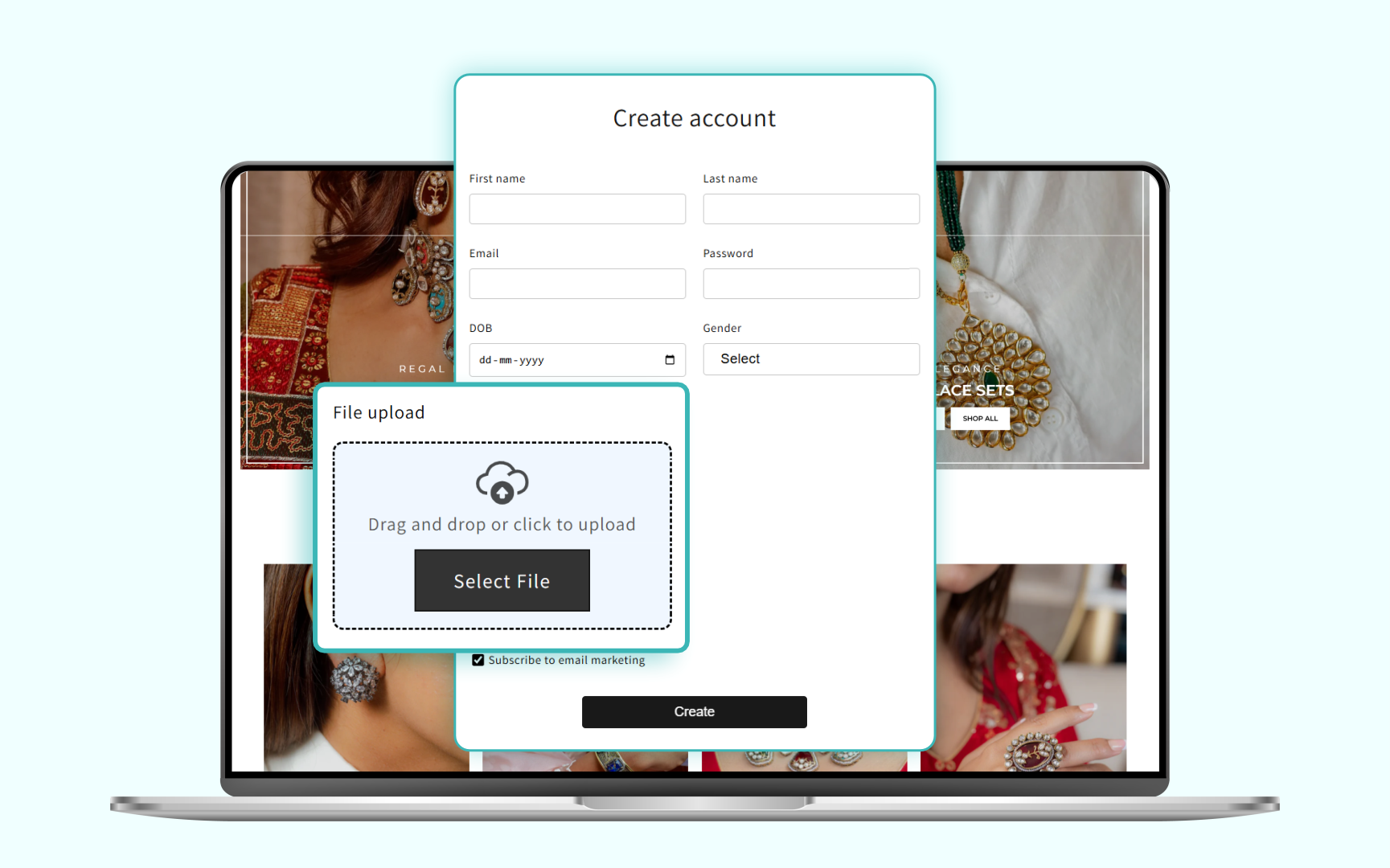
If you run a B2B or wholesale store on Shopify, you already know that managing tax-exempt customers is far more complicated than it should be.
You need to collect Shopify tax exemption certificates, validate them, store them securely, and ensure they sync to the right customer account — yet Shopify’s native setup for tax-exempt customers is extremely limited.
Here’s the real problem:
Every time a merchant manually collects tax-exemption certificates, they lose time, revenue, and accuracy.
Support tickets increase. Orders get delayed. And accounting teams face constant reconciliation issues.
In 2026, B2B brands want a fully automated, compliant, and trackable system for:
- Shopify tax exempt customer signup
- Shopify upload tax exemption certificate
- Shopify VAT exemption upload form submissions
- Shopify customer document upload (ID, GST, VAT, tax forms)
- Mapping documents to Shopify metafields
- Auto-approval or manual approval for exempt customers
And that’s exactly where this guide comes in.
Why Shopify’s Default Setup Fails B2B Brands

Shopify is excellent for D2C.
But for B2B?
The gaps are obvious.
1. No Native File Uploads in the Signup Flow
Shopify does not allow customers to upload documents (GST, VAT, Tax ID, Reseller permits) during signup.
You need a Shopify customer document upload app just to get started.
2. No Automatic Tax-Exempt Validation
You must manually check every tax certificate, message customers by email, and mark them tax-exempt in admin.
This slows down approvals and creates friction.
3. No Structured “Company Account” Registration
B2B customers often need:
- Company name
- Tax number
- VAT exemption certificate
- Reseller permit
- Manufacturing license
- Purchase authority
Shopify’s default fields do not support this.
4. No Metafield Mapping
Shopify does not automatically map uploaded files or fields to:
- Customer metafields
- Company metafields
- B2B location metafields
So your team must manually migrate data.
5. Compliance Risks
Improper document storage can lead to legal issues, especially when dealing with tax-related certificates.
This is why modern B2B stores need a system designed for:
- Shopify tax exemption certificate collection
- Shopify tax exempt customer signup
- Shopify custom signup fields
- Shopify VAT exemption upload form submissions
The Hard Way: How Developers Try to Build This Manually
To build a functional B2B tax exemption onboarding system, you would need to:
1. Create Custom Input Fields
Using Liquid templates, custom form blocks, and JavaScript validation.
2. Build a File Upload Engine
Using Shopify Files API and custom upload endpoints.
3. Build a Document Review System
Approve / reject functionality with status tracking.
4. Map Everything to Metafields
Highly technical setup with APIs and namespaces.
5. Create Tax-Exempt Logic
Mark customers as tax exempt via API.
6. Manage File Storage Compliance
Requires encryption, access control, and audit logs.
This entire setup can take 40–60 development hours.
The Custlo Way: Tax-Exempt B2B Signup in Minutes (No Code)
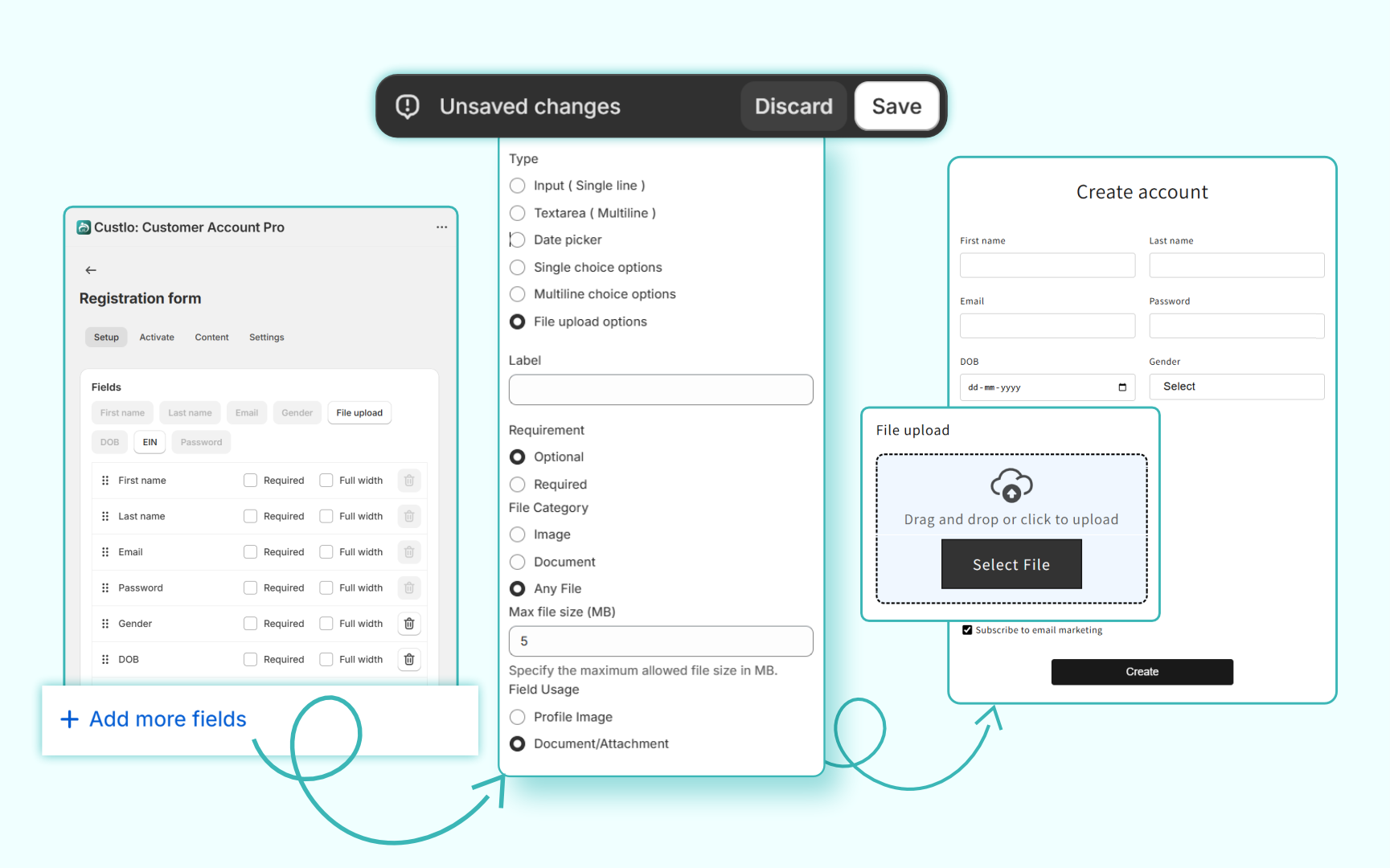
1. Custom Signup Fields for B2B (No Coding)
- Company name
- Tax ID
- GST number
- VAT number
- Document upload
2. Upload Tax-Exemption Certificates at Signup
- Collect certificates
- Require upload before approval
- Auto-store files in metafields
3. Automated or Manual Approvals
- Auto-approve
- Manual review
- Reject invalid docs
4. Shopify Metafield Mapping Done Automatically
No developer. No API calls.
5. Fully Branded B2B Onboarding Portal
Structured registration + document upload + status tracking.
Comparison: Default Shopify vs Custlo’s Enhanced B2B Workflow
| Feature | Default Shopify | Custlo Enhanced |
|---|---|---|
| B2B customer signup | Generic | Fully customizable |
| Tax exemption certificate upload | Not available | Built-in |
| VAT exemption upload form | Not available | Yes |
| Document storage | Manual | Automated + secure |
| Metafield mapping | Manual setup required | Auto-mapped |
| Approval workflow | Not supported | Full review panel |
| Status notifications | Not built-in | Automated |
| Compliance & audit trail | Not supported | Fully supported |
| No-code setup | No | Yes |
Step-by-Step: How to Enable Tax-Exempt Signup With Custlo
Step 1: Install Custlo from the Shopify App Store
Click: Start your 14-day free trial of Custlo
Step 2: Add Custom Signup Fields
Inside the dashboard:
- Enable “Company Registration”
- Enable “Tax ID / VAT”
- Enable “Document Upload”
Step 3: Add a Shopify VAT Exemption Upload Form
Toggle on:
- File Upload (PDF, JPG, PNG)
- Required field
Step 4: Set Approval Rules
- Auto-approve
- Manual review
Step 5: Map Fields to Metafields
Custlo does this automatically, but you can check the mapping under: Settings → Metafields → Customer / Company
Step 6: Go Live
Your customers now sign up through a professional B2B portal.
ROI: Why B2B Merchants Choose Custlo
1. 50% fewer support tickets
No more “Where do I upload my GST certificate?”
No more chasing customers for documents.
2. Faster onboarding → faster first purchase
Customers can:
- Register
- Upload documents
- Get approved
…all within minutes.
3. Higher accuracy and compliance
All certificates are stored securely, timestamped, and traceable.
4. Zero development cost
Brands save thousands every year by not maintaining custom code or workflows.
If you want a proper tax-exempt onboarding system for your Shopify B2B store, Custlo gives you everything that Shopify doesn’t.
Ready to Transform Your B2B Registration?
Start your 14-day free trial of Custlo on the Shopify App Store.
Transform your B2B registration workflow — without writing a single line of code.
